The Studio
Describe an ad, read the quote, generate, then improve or reuse the result.
Describe what you want
Type an idea in plain words, for example "a tenant tops up a prepaid meter with M-Pesa, 10 seconds, vertical". Say how long and which shape if you know; otherwise the Studio picks sensible defaults.
Commands start with a slash. Type / to see them:
/videoa clip from a description (4 to 30 seconds)/imagea still image/animatebring a finished image from this project to life/extendcontinue the last finished clip/scripta timed ad script to read first (free)/quotecaptions, voice-over and music, priced on request
Use the bar above the chat to pick a brand, product, characters, template and campaign. A project remembers them, so you only pick once.
Read the quote
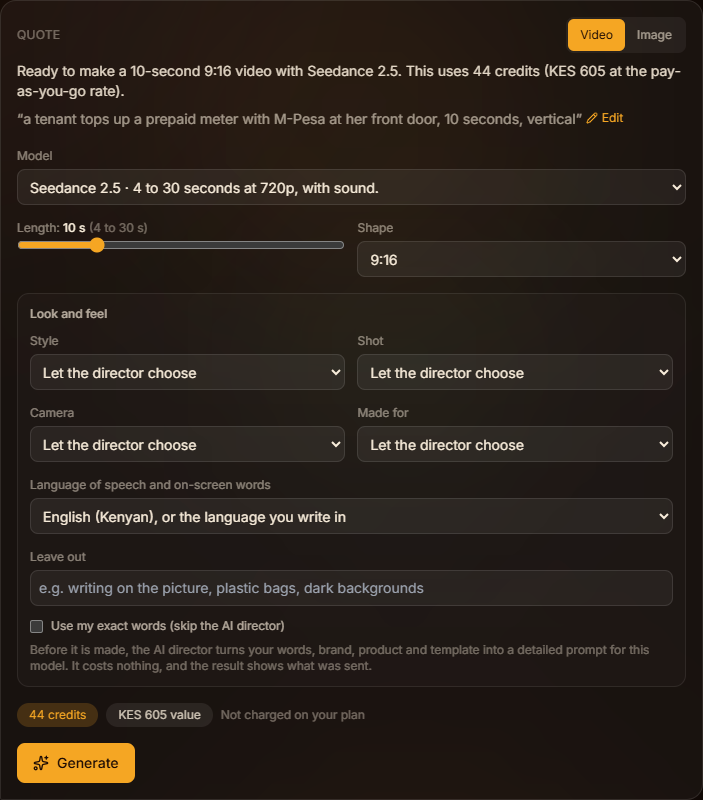
The Studio answers with a quote: what will be made, how long, which shape, which model, and the credits it uses. Nothing is charged yet.
On the quote you can:
- switch between Video and Image
- pick the model, for example AK1 (African Kontent 1)
- change the length and shape
- open Look and feel to choose a style, shot, camera move, platform, language and things to leave out
- tick Use my exact words to skip the AI director
Press Generate when you are happy. If you are short of credits, the button offers a top-up instead.
The AI director
Before your request reaches the model, the AI director rewrites it into a detailed production prompt using your brand, product, characters, template, choices and what the Studio has learned about your brand. It is free and takes up to a minute while the generation starts.
Open Prompt we sent on any result to see exactly what the model received, copy it, or start a new request from it.
Results
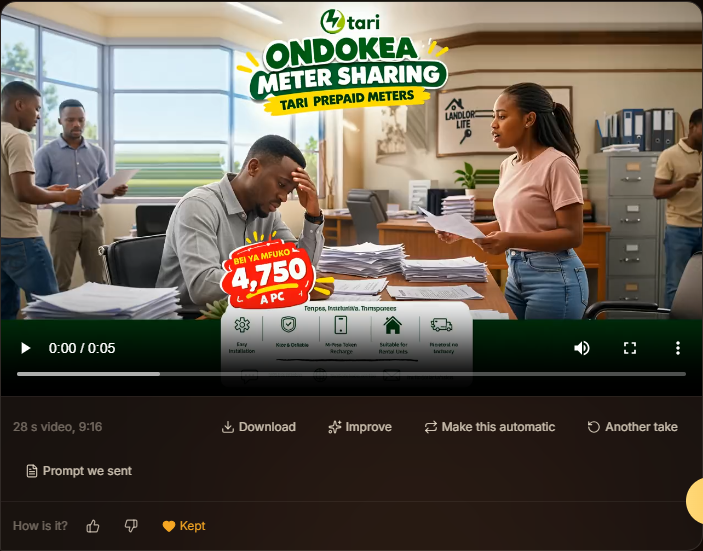
Videos take a few minutes and images under a minute. You can leave the page; the result appears when it is ready. Under each result:
- Download the file
- Animate an image, or Extend a clip
- Improve it: tap ideas or write what to change, and get a new quote
- Another take with the same settings
- Make this automatic to set up Autopilot from it
- rate it with a thumbs up or down and a reason, and Keep your favourites
If a generation fails, its credits go back to your wallet automatically.