Scripts with /script
Have the AI director write a timed ad script, correct any word, then make the video.
Ask for a script
Type /script, the length and what the ad is about:
/script 30 seconds: a landlord struggles with one shared meter, then sub-meters give every tenant their own units
Scripts are free and take about a minute. A Writing the script card shows while the director works; you can keep working in the meantime. The script uses the brand, product, characters and language you picked.
Read and edit it
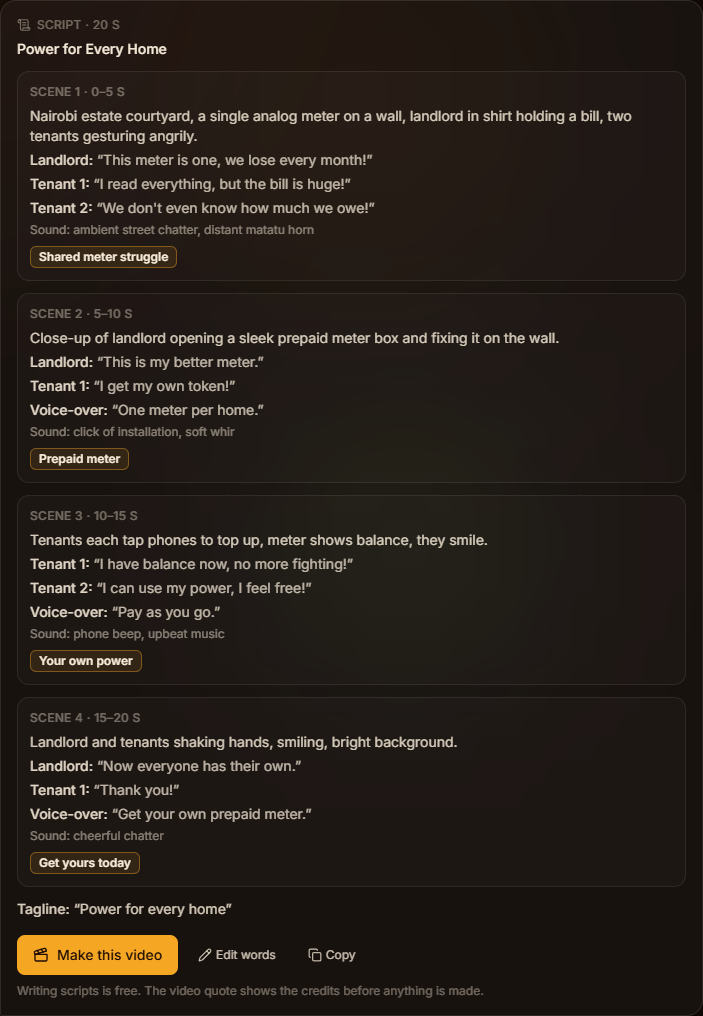
The script arrives as timed scenes. Each scene shows what we see, who speaks and their line, any voice-over, the sound, and the words on screen.
Press Edit words to change any of it. Check on-screen words letter by letter: prices, phone numbers and web addresses must be exactly right. Press Copy to share the script with your team.
Make the video
Press Make this video. You get a normal quote whose length follows the script; pick AK1 or AK2 and the language, check the credits, and press Generate. The director uses your approved script exactly as written.
When the video is ready, open Script under it to see what it was made from. A video you make without a script also gets one: the director writes it first and keeps it with the result.