AK1 and AK2: African Kontent models
When to use AK1 or AK2, and how to set the language of speech and on-screen words.
Two models, two styles
AK1 (African Kontent 1) runs on Wan 3.0 and makes grounded, documentary-style video: real homes, shops and streets, natural daylight, candid people. Use it for true-story ads, testimonials and before-and-after scenes. 2 to 30 seconds, with sound.
AK2 (African Kontent 2) runs on Seedance 2.5 and makes vivid Afro-cinematic commercials: bold colour, modern African fashion, music-led pacing. Use it for launches and scroll-stopping social spots. 4 to 30 seconds, with sound; it can also change a clip you attach or continue a finished one.
For both, the AI director adds African scenes, people, language and accents to your request.
Pick the model on a quote
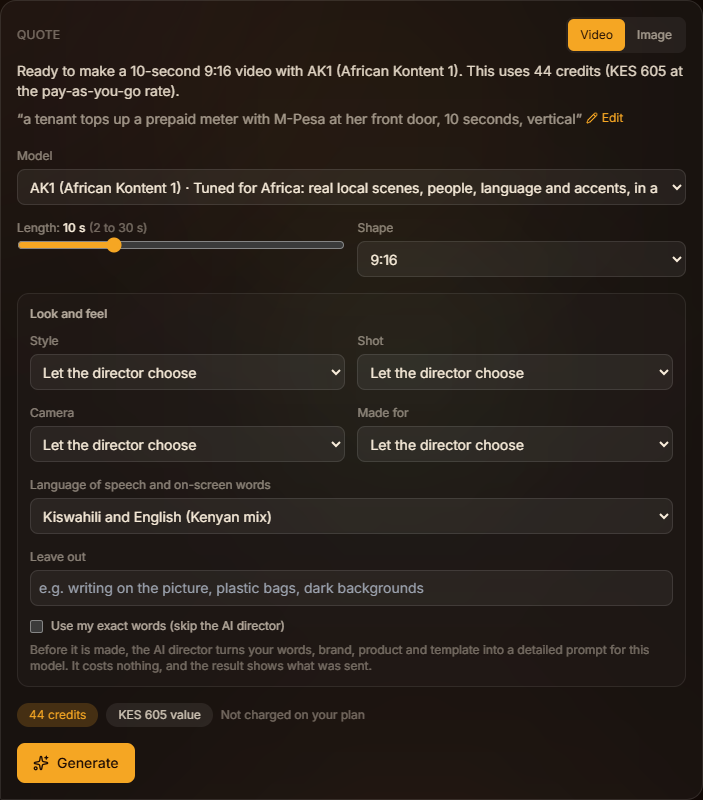
On any video quote, open Model and choose AK1 (African Kontent 1) or AK2 (African Kontent 2). The length adjusts to what the model makes, and the credits update. The quote names the model before you generate.
Choose the language
Open Look and feel on the quote and set Language of speech and on-screen words:
- English (Kenyan)
- Kiswahili
- Kiswahili and English (Kenyan mix)
- English (international)
- French
- Chinese (Mandarin)
Every spoken line, the voice-over and every word on screen follow it. Brand names, prices, phone numbers and web addresses stay exactly as you typed them. Left empty, the director uses English as Kenyans speak it, or the language you wrote your idea in.